Exporting Your DDQ/RFP
You can export at any stage of the process, you do not need to wait until everything is finalized. When exporting, any questions still in Verify status are clearly highlighted so reviewers can distinguish between final and non-final answers.
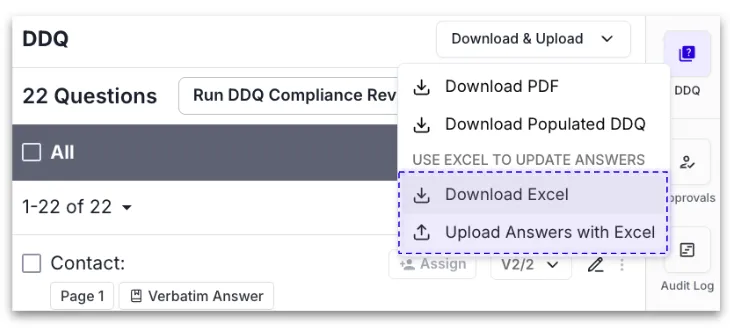
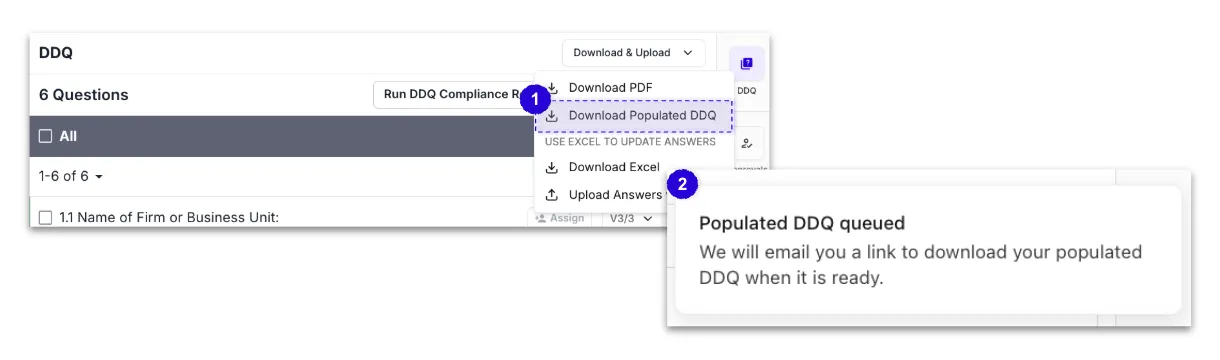
To export: Use the drop-down in the upper right-hand corner of the screen.
Export Formats
Type | Format |
|---|---|
Native file formats | Microsoft Word, Microsoft Excel |
Norm Ai export formats | PDF, Word, Excel |
Auto-population of your DDQ/RFP
When you export your submission, Norm Ai will populate your answers directly into the original questionnaire format. The exported file will reflect the native structure of the document as it was uploaded with answers filled into the corresponding fields. Once the export is ready, you will receive an email with a link to download the file.
Note: Missed answers or answers that don't fit within the parameters of the space provided in the questionnaire will appear at the bottom of populated DDQ for your review and awareness.
Offline Workflow
Norm Ai supports an offline editing workflow for teams that need to finalize answers outside of the platform.
To use the offline workflow:
- Select Download & Upload from the top of your submission and select Download Excel to export your populated DDQ in Excel with other team members or contributors that aren't in Norm.
- Make any necessary edits offline.
- Re-upload the file using the Upload Answers with Excel button. Norm Ai will extract answers from the re-uploaded file, and surface them back into the review pane for your continued review.